Mistakes Self-Publishers Make When Publishing Print Books (And How to Avoid Them)

We often talk about how attractive the book cover should be, and for good reason. Poor cover art is the #1 mistake Self-Published authors make when publishing print books.

But we know that already.

Let’s go inside of the book this time.

When preparing your manuscript for publishing in a print book, the formatting should be done in a way that is different from a college essay, research paper, or blog post.

Here are the top print book mistakes I see self-published authors make and how to avoid them.

Disclaimer. I am not a lawyer. Nothing beyond this point should be taken as legal advice.

No Copyright Page

The copyright page of a book is one page that lets people know who owns the rights to the book and that, generally, the author’s intellectual property cannot be copied without permission.

You do not need to register your book with the copyright office to add this page except if you want to. In this case, register the copyright at copyright.gov. You can do it after you publish the book to Amazon since it takes about 6-13 months (of this writing) to go through.

However, know your book is automatically under copyright when creating it.

The copyright page discourages theft, such as plagiarism, and announces you as the book’s owner. It is like a “No Trespassing” sign; every book should have one.

If you own a software program such as Atticus (PC) or Vellum (Mac), they have copyright templates already designed for you. If you don’t have these programs, creating one is easy. All you need is a copyright notice and a rights reserved.

© 2024. Yecheilyah Ysrayl. All rights reserved.

You may also add additional information. Below is an example of a basic, full copyright page.
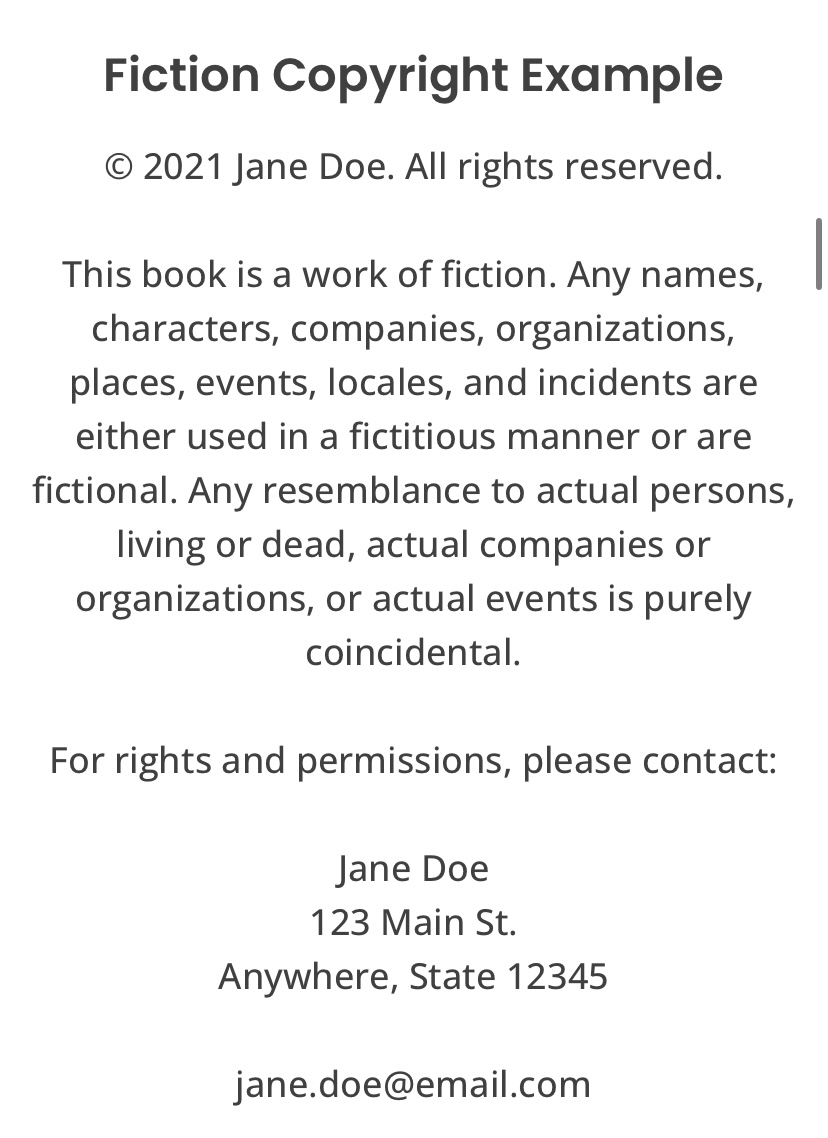
It should also include your ISBN. For more on ISBNs, click here and here.

This page should appear at the beginning of the book, also known as the book’s front matter, after the title page. The title page is one page that looks like the cover but without the artwork. It includes the book’s title and the author’s name. This title page may appear twice, depending on the publisher. Once at the book’s opening and once more before the opening chapters.

The Author’s Name and Title are Not on the Spine

This is easily avoidable with a professionally designed book cover, but let’s touch on it a bit.

Some books do not need a spine because they are too thin. Otherwise, you will want to have your author’s name and title on the spine of your print book.

The spine binds the front and back of the book and is also important for bookstores.

With the author’s name and title on the spine, a book is easier to find for someone skimming the titles on shelves. Since self-published books are already underestimated, a book without a spine can easily get lost, and the author misses out on sales.

The first thing a potential customer will see is the outward-facing spine, so if the book does not have a title or author name, readers won’t even notice the book.

No Chapter Headings

A chapter heading is how you organize your book so readers know when a section begins and ends. It is literally as simple as adding Chapter One….Chapter Two…Chapter Three.

Chapter headings can also have subtitles or names instead of numbers. In Black History Facts, I use chapter headings and subtitles.

Chapter One (Chapter Heading)

What You Didn’t Learn About Sundown Towns

(Subtitle)

The purpose of chapter headings and sections is to organize the book to make it easier to read and follow. Without it, readers might get confused about where they are in the story. Believe it or not, there are so many authors who make the mistake of not including chapters, making the book look more like an essay.

If you have a software program or professional who formats books, this is easily avoidable as they can add them for you.

Fancy Text

One of the most common mistakes of first-time self-published authors is using fancy text.

Times New Roman, Arial, Helvetica, Calibri, and Cambria are great fonts for books that make them easier to read!

Cursive writing and other fancy text, including colored fonts, make them harder to read.

Too Much Space and Not Enough Words…

Indie Authors who self-publish should also be aware of too much spacing, making the book look like it was written for children (unless it was). An adult-level book should not have so much space between it and the next section that you could write a short bio about your life in between.

Be sure to fill blank spaces with words or shorten the book’s length.


Plan to publish a print book? Don’t forget to add a copyright page, spine, chapter headings, text that is easy to read, and a book with enough words to fill it out.

Investing in professional cover design and interior formatting will help with all of this!
Click here for more Indie Author Basics to encourage you through the Self-Publishing / Indie Author Process!

Dear Self-Publisher, How Your Book Looks Inside Matters Too: Don’t Forget Typesetting

By now, we know how important it is to have a dope book cover for our Self-Published book.

But it’s not always the book cover that gives a book away that it’s Self-Published. Sometimes, how the book looks inside makes it look homemade.

Typesetting: the spacing between words and letters, the font type & size, the page’s trim size, margin, and overall layout.

Grab a book that has been traditionally published (or professionally Self-Published!) and look over the pages. Take note of how it appears on the inside. Look at how tidy the words are! How are the left and right edges aligned, the typefaces are the same, and the paragraph spacing is perfect?

This is the result of expert typesetting.

Many Self-Publishers skip this stage. We don’t realize it because we submit the Word or PDF file we used to compose the book to our preferred print-on-demand.

But what’s wrong with that?

There is nothing wrong with that, except our manuscripts do not print exactly as we type them in Word, Google Docs, or Scrivener. The document requires proper typesetting and formatting for print and digital devices like Kindles and Tablets.

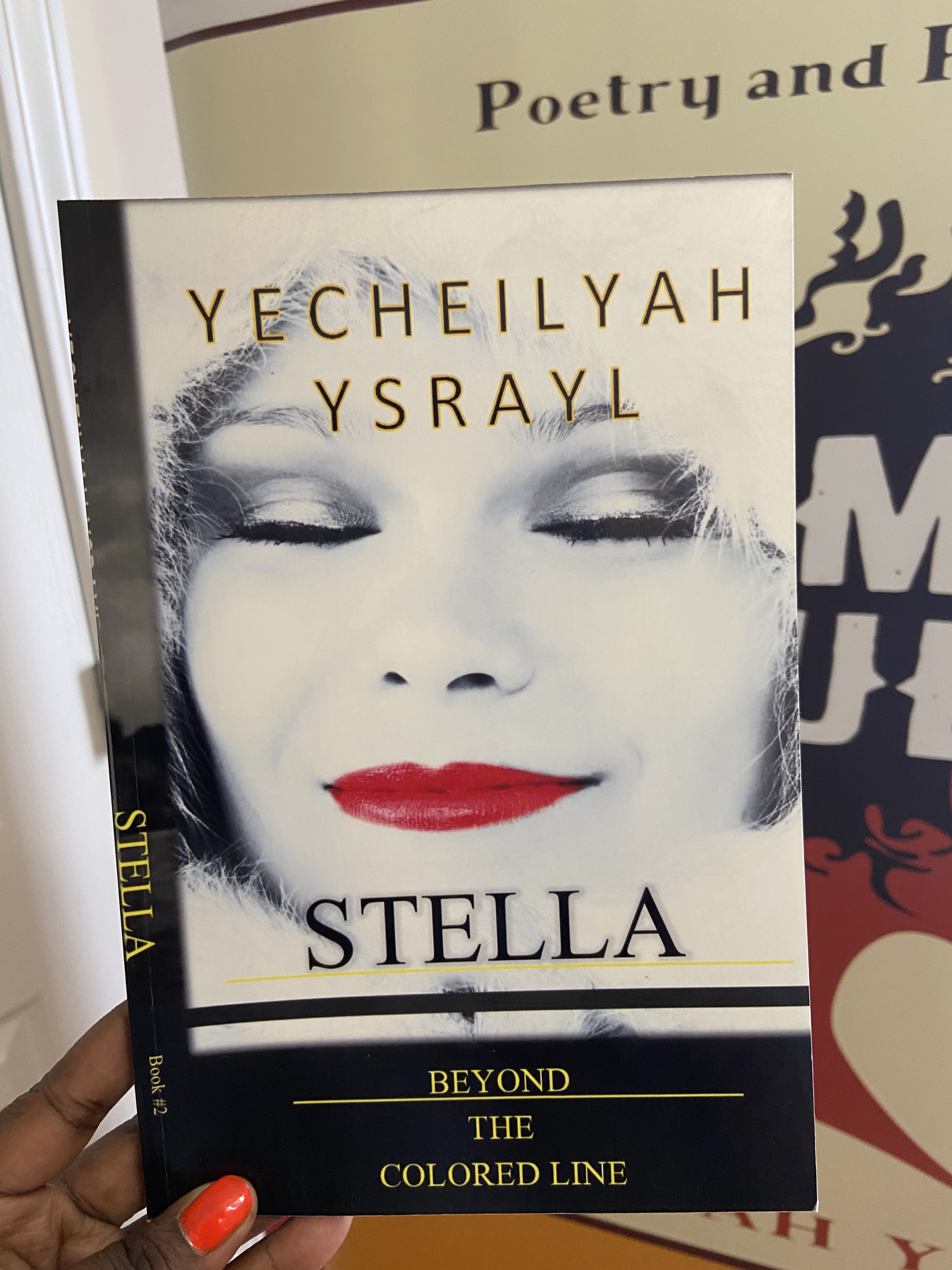
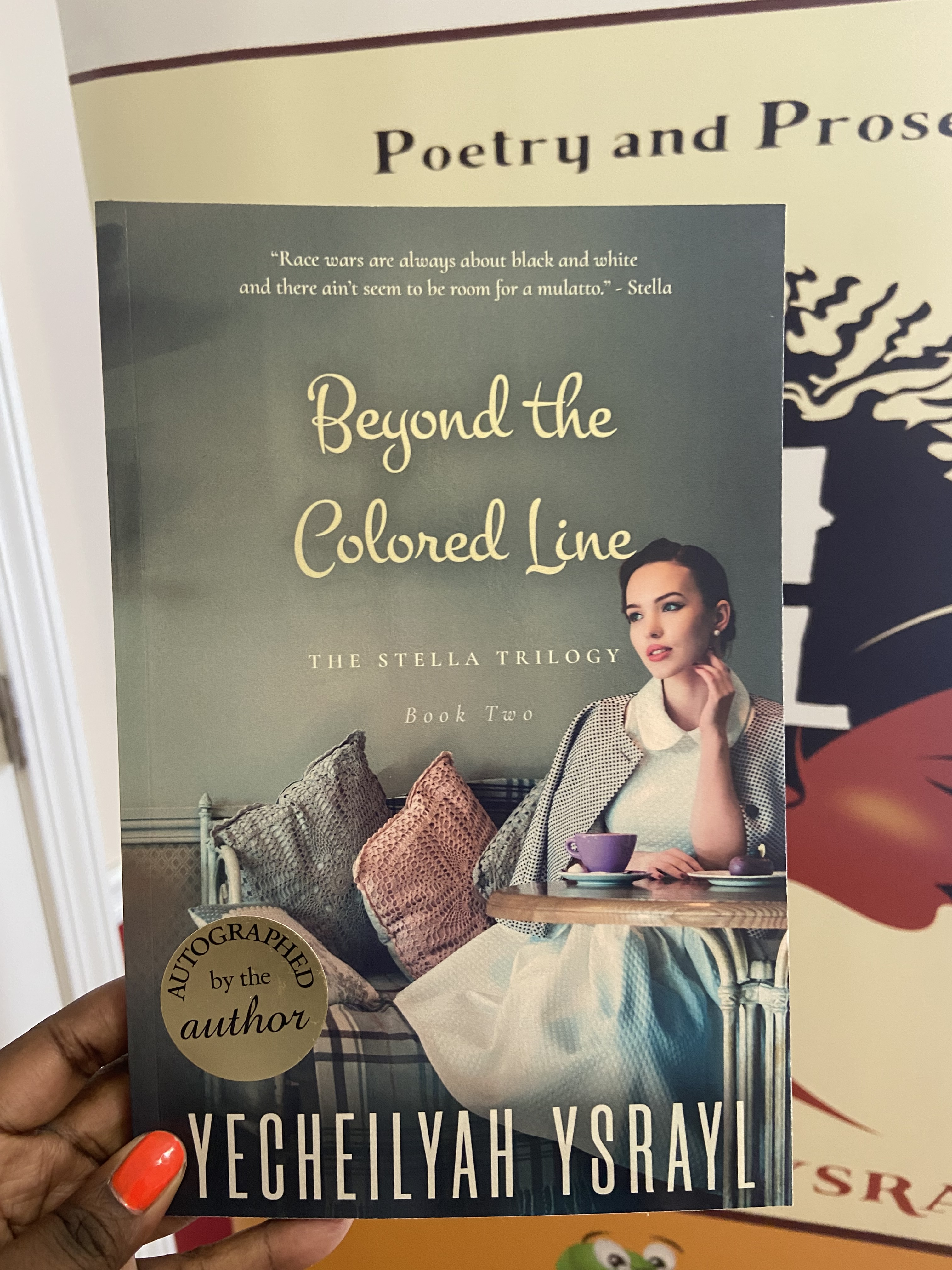
The cover of your book may suffer from a poorly formatted book. Take a look at book two in The Stella Trilogy, first edition.

I actually like the initial cover image. The problem is with the rest of the book.

Do you notice how the spine is twisted? Because the book was too short to have a spine, this occurred. Giving it one, nonetheless caused it to wrap around and face the front.

I didn’t realize the book needed more pages for a full spine because I’m not a graphic artist or skilled book cover designer.

While this cover image doesn’t pop as well as the first (IMO), the book is professionally bound. The alternate ending made the book long enough for a spine in the revised edition. The book features a more professional cover, professional formatting, and professional editing.

Recommendation. Before having your entire cover designed, wait until your book has been edited and properly typeset. Your graphic artist will require the precise number of pages and trim size to create a cover, back, and spine that perfectly matches the book.

Moral. Before hitting publish, make sure to hire a skilled typesetter to correct the placement of your text on the page.

If you want to try it yourself, here are some sources:

  • Reedsy Book Editor
  • Adobe In-Design
  • Microsoft Publisher
  • Vellum
    *Fiverr. Note: Professional typesetters can be found on websites like Fiverr. Make sure they are typesetting rather than just typography, though. Typefaces and other decorative elements make up typography. That’s not typesetting. Additionally, if they are only using Vellum, you can do it on your own by simply purchasing it.

Click Here to Check out More Indie Author Basics

Indie Author Basics streamlines and simplifies self-publishing so you can publish high-quality books without pulling out your hair.

Let’s Congratulate Don! Introducing DSM Publications!

Guys, help me to congratulate my author friend Don Massenzio on his new business endeavor. DSM Publications offers Editing and Formatting services to Indie Authors at a reasonable rate with advice and networking with other authors. Don is a big supporter of this blog so I am delighted to return the favor! Be sure to like his new Facebook page HERE and to follow his new blog HERE and subscribe to his email list HERE. (If you sign up for DSM Newsletter, you’ll receive a free copy of Don’s book, The Ultimate Guide for Independently Published Authors.) To learn more, visit his post HERE . Remember, we are in this together! Whoo hoo.

Self-Publishing and Formatting Quick Tips

Self-Publishing and Formatting Tips

jorobinson176's avatarLit World Interviews

One of the biggest challenges to Indies is getting a professionally published looking book when up against the costs of editing, proofreading, formatting and cover designs. If you can afford these services then foregoing them is not a good idea, but when you really can’t afford them they can mean the death of some really great literature. There are a couple of things that can help though.

Editing or Proofreading Swopsies

Rather than simply asking for Beta readers, offer to swop proofreading services. Writers have a different kind of eyeball when reading. I’ve just finished a Joanna Trollope book, professionally published by one of the big houses, professionally edited and put together, but so far I’ve found a couple of typos and instances of poorly strung together sentences. As far as the cover design is concerned, if it wasn’t for the fact that I was specifically looking for and wanting…

View original post 1,313 more words

Quick Tips for Paperback Page Numbering

Most valuable tutorial on numbering your print books.

jorobinson176's avatarLit World Interviews

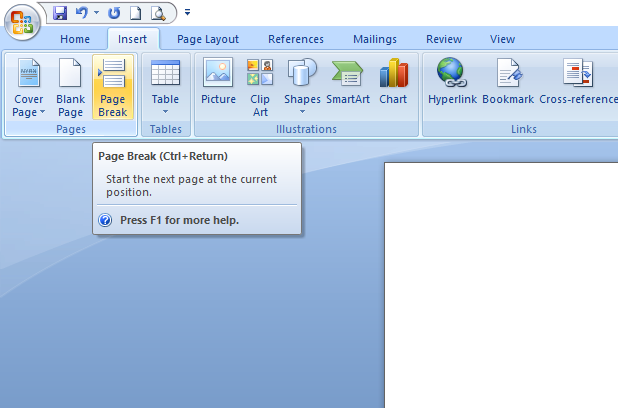
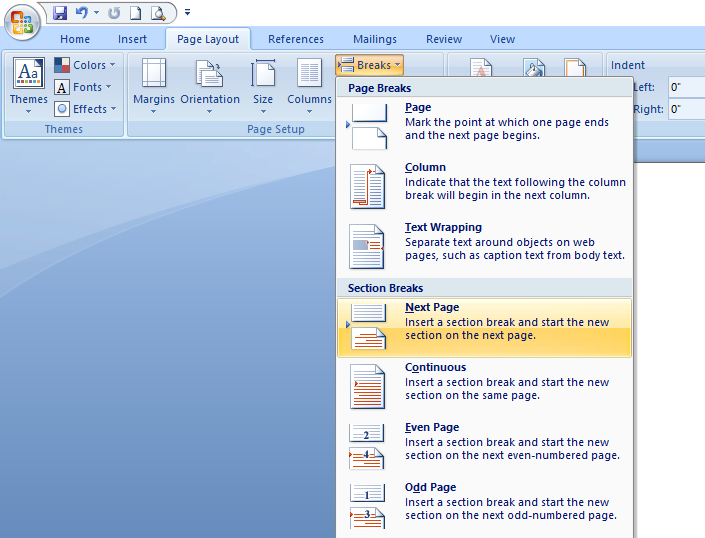
When numbering the pages of your paperback manuscript, the thing quite a lot of Indies have trouble with is that they use Page Breaks rather than Section Breaks. A Page Break is just that—starting a new page within the same section of a book. With a Section Break you can have totally different numbers and Headers and Footers for each section. The way to ensure that your numbering doesn’t bounce back from the first chapter of your book to the front matter is to get rid of all the Page Breaks in first pages and replace them with Section Breaks.

page-break
Section Break after title page, and again after the table of contents, and every other page you have in your front matter.

section-break
Then double click into your Headers and Footers up to and including the first page of your first chapter, and unlick Link to Previous. This will ensure that…

View original post 208 more words

Wise Ink: ERROR: Kindle’s Latest Warning Message

ERROR--700x350

Wow, check out this post from Wise Ink about Amazon’s coming Error Message. This is exactly why I prefer to always have a paperback copy of my books available. Electronics are not dependable and in the case that a great book is flagged because of minor errors or formatting issues, leaves the reader to do nothing but abandon that authors work. With no option to purchase a paperback / hard copy, what options are available for the reader but to abandon that book altogether? I’m not concerned about this to be honest (I try not to worry about things much anymore, especially things I can’t change) but I do see how it can be a hindrance to many Self-Pub authors. I would suggest making your work available in as many formats and on as many platforms as possible and to have an author website or blog set up as another option from which readers can find your work. I would have a paperback/hard-copy on standby just in case. Yes, technology is increasing every day and changing the book publishing industry, but don’t believe the hype. Readers still buy paperback books! To take it a step further, you can set up a DBA (“Doing Business As” name – A fictitious name (or assumed name, trade name or DBA name) is a business name that is different from your personal name, the names of your partners or the officially registered name of your LLC or corporation) and try to get your books stocked at a major distribution company where you can buy in bulk directly from them. I know, easier said. I probably just spoke of something nearly impossible unless your Oprah but it can be done. (In my “Flash” voice “Believe in the impossible!”) The process is long and challenging and tedious and I’m sure we will all be wanting to pull our hair out BUT I think it will be of great benefit in the end. I’m interested in why B&N NOOK, KOBO, and other platforms are not as prominent as Kindle as additional sources in which ebooks are sold. While I can’t “knock” Amazon for wanting to distance itself from the the lack of “Grammatical / Formatting professionalism”, I’m not sure if relying solely on Amazon as a source where readers can find your book is wise.