Premade Book Covers: 2 Things to Keep in Mind

There’s a quote floating around somewhere that says:

“Don’t go broke trying to prove to other broke people that you ain’t broke.”

Many authors are on budgets now more than ever and this has created an entirely new source of income for graphic designers, many of whom offer premade book covers as well as custom made. These artists have made our life a little easier by offering professional covers at lower rates than custom covers. While custom covers are preferred, not everyone can afford a new custom cover for every book (except for people who make their own covers or knows of someone who does it for them free of cost) so consider this post for those of us “balling on a budget.” I believe in investing in your best and if you can afford to pay for a custom cover and high-priced editing, go for it. There’s nothing wrong with that. However, just know you don’t have to go broke to publish your book. The same way we can find reasonable editing prices is the same way we can find reasonable book cover prices for covers that won’t look generic.

Still, Premades have a unique struggle we must consider when choosing them.

All of the factors that go into articulating your story to a designer in a way that will help them to design a good cover is internal. By internal I mean that if you are choosing the premade, you have to make these decisions for yourself. You have to understand your target audience, your genre, and identify the key features enough to know if the cover is the right fit for you. This isn’t easy.

Many people have asked me about the cover for Renaissance. The truth is that it was a premade I was blessed to find! All the artist did was edit the text. Here’s what a reader said when leaving a review for the book on Amazon:
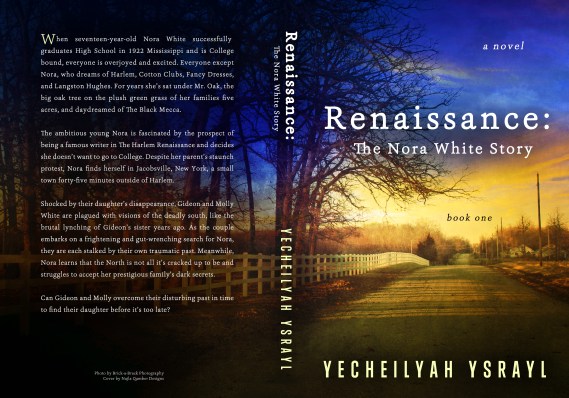
“The first thing that drew me to this novel was its beautiful cover. A deep blue sky fading into a sunset which bakes an old country road golden brown.”

Guys, I didn’t spend a lot of money on this.

As soon as I saw the cover I knew it was the right fit for Renaissance. Though it’s a premade, there are some things that made it unique:

  • Although it was a premade, the photo is a real photo taken by Brittany Cox and then sold to designer Najla Qambers to be used for a premade book cover. It is not a stock photo.


  • The elements of the photo fit the context of the story, which starts off in Jacksonville, MS where the White family owns and runs a farm.


  • The book cover matches other books in my genre (Historical Fiction)

I looked at other covers and thought about purchasing a complete custom cover but my money wasn’t agreeing with that so I just went back to that same image, praying no one had taken it. The use of a real country road photo really sets it apart. It was also the only of its kind being sold so I was anxious to get it as it was literally just one available. When I was ready, I contacted Najla Qambers of Brick-a-Brack Photography and secured my cover.

  1. Watch Out for Overly Used Stock Photos

One of the things that made the Renaissance cover unique is the use of a real photograph. There are some great premade design covers out there but many designers use the same stock photos. All designers will have a message that says the book cover is not sold after you buy it and the cover is removed, which is true. You will often see “Sold” on the designer’s site to indicate that cover has been taken. But while the same cover cannot be sold again, the same stock photo is sometimes used in a slightly different design. The particular cover you bought may not be sold again but the same stock images can be used again. Keep this in mind when looking for your premade.

Joshua Jadon sums it up pretty well:

“You also may get less attention from a generic cover because it may be a little easier to ignore. Readers are looking for something interesting and exciting that grabs their attention, and a book that might have the same cover—or at least the same images—as several others often won’t get that kind of attention. A unique style or look can influence readers’ selection process. If your cover doesn’t reflect that … well, it may not get noticed.”

But, your premade does not have to look generic.

“It always seems impossible until it’s done.” – Nelson Mandela

It is possible to find a stunning premade that looks custom made. I got tons of compliments on this cover and requests for who designed it. People thought it was custom made.

2. Watch out for Bulk Premade Deals

Boy did I fall for this one! Book cover design is a skill. Period. Even though there are designers offering bulk book covers at discounted prices you can edit in Photoshop, it won’t do you any good without skill. I made the mistake of falling for this and while some of the bulk covers I purchased are nice (and I am competent in editing covers in Photoshop), it is not something I will do again. A clever move by designers but not such a good deal for authors. Unless you are Photoshop Savvy, have someone on your team who is Photoshop Savvy, or you are a graphic designer, it will do little to benefit you to buy twenty premade book covers you have to design yourself using the software you don’t know how to use. 

While it may start off looking professional, your lack of skill can make it look generic because graphic designers are skilled in typography, colors, blending colors, and anything else that may require a keen eye. You can mess up a nice cover not knowing what you’re doing which will lead you back to square one.

Here are some websites with some unique premade book covers. There are more, I am sure, but these are ones I’ve investigated myself. I rarely see the stock photos from their covers used by other designers.

For more posts on Indie Publishing, be sure to visit the new Indie Author Basics with EC page.
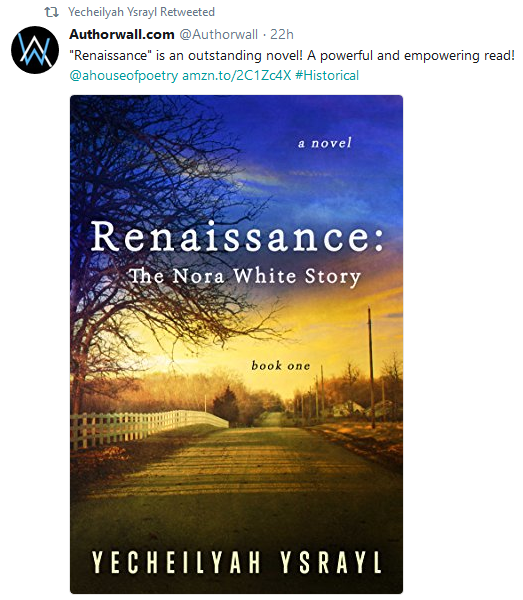

Be sure to pick up your copy of Renaissance: The Nora White Story (Book One) HERE.

Easy Blogging for Authors: 10 Tips for a Successful Author Blog, Anne R Allen

Anne is at it again with a most excellent article on Blogging for Authors. If you’re an author and you’re looking to learn more about how your blog differs from a business blog, check out this post. She talks being true to your brand, not defining your blog success by numbers, networking and not sacrificing your WIP (work in progress).

My biggest mistake was that I didn’t see that an author blog has a different purpose and goal from a business blog. Author blogs aren’t about making money directly with ads or sales.

Instead, they provide a platform for your writing and a way to communicate with readers and fellow writers. An excellent one. In fact, a blog is still the best platform-building tool for authors, according to agent Laurie McLean of Fuse Literary, (Laurie will be visiting us in January.)

Good writers don’t need gimmicks. We only need to entertain and inform: content really is king. Be accessible and be yourself. Nothing else matters. (Well, correct spelling and grammar help too. 🙂 )

Click through to the ORIGINAL POST HERE to read the entire article.

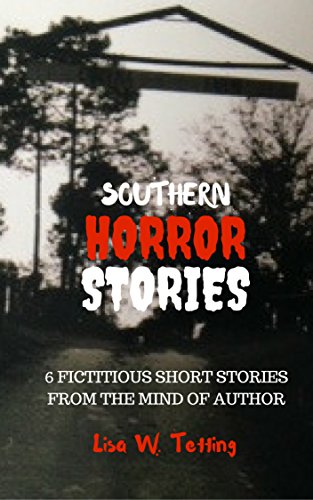
Yecheilyah’s Book Reviews – Southern Horror Stories by Lisa W. Tetting

Title: Southern Horror Stories

Author: Lisa W. Tetting

Print Length: 68 pages

Publication Date: October 26, 2017

ASIN: B076WW49KN

Almost 400 years ago, the first enslaved Blacks arrived in the Virginia colony at Point Comfort on the James River. Spanish records suggest that the enslaved were captured in the Portuguese colony of Angola. At first, the number of enslaved taken was small. In about 1650, however, with the development of plantations on the newly colonized Caribbean Islands and American mainland, the trade grew.

But what if things had turned out differently? What if the enslaved could exact immediate vengeance on their oppressors and gain their freedom with help from their ancestors? That is essentially the theme connecting six short stories in Lisa W. Tetting’s short story collection, Southern Horror Stories.

Each story begins with a tragedy familiar to that of chattel slavery. In Barren Plantation, Pansy witnesses the death of her baby girl immediately after giving birth. Afterward, the woman bathes in the child’s blood, soaking up the energy, and begins to hear chanting in a foreign language. She becomes possessed and starts chanting along with the voices until an entity arrives to give her word on her next move. She is to save the other children on the plantation in a most chilling way.

In “Caleb’s Stitches,” children of the enslaved go missing. In “Mind of Hope,” a girl witnesses her mother’s beating death and her father’s shooting. Her ancestors instruct her on how to get revenge for her parents. And in Underground Hell Road, the slaves have overtaken the plantation in an intelligent plan to create a portal to freedom. All the stories involve the enslaved receiving guidance from their ancestors on how to strike back at those who hurt them.

I loved most the connection between the stories. Linking Barren Plantation and Caleb’s Stitches was brilliant and so was the connection between Slave Island and Pirates of Slavery. I would also love to see Underground Hell Road fleshed out into a full-length novel with elements of the other stories possibly weaved in. I love the idea of the plantation being a way for the slaves to transition their way to freedom and would love to read a full novel on the concept.

Southern Horror Stories is an easy and entertaining read that is not recommended for children (though with the author’s talent, I can easily see a PG version of the stories to help youth understand about the horrors of slavery). Lisa’s writing style is lovely and easy to understand.

Plot Movement / Strength: 4/5

Entertainment Factor: 5/5

Characterization: 4/5

Authenticity / Believable: 4/5

Thought Provoking: 5/5

Overall: 4/5

Southern Horror Stories is Available Now on Amazon

Connect with Lisa Online!

Blog

Website

Twitter

IG

Goodreads

Indie Authors: Stop Giving Away Your Books for Free – Angela Ford

Check out this article by Angela Ford on giving away your books for free. I’ve never been comfortable giving away my books except to my ARC / Beta Readers so I find her perspective interesting. I would love to hear other’s opinion on it though and to be provided with more resources to support the article. The comment left on the post poses a good question too.

What about you? Do you think authors should give their books away for free? Why or why not?

“In the indie author community, there’s a false mindset you have to give your books away for free before people will be willing to purchase them. If the first book in your series is free, someone will pay $0.99, $2.99 and even $5.99 for your full priced books. In truth, I’ve been seeing the opposite effect and heard from indie authors who have had the same experience. Here are some examples…”

Click through to the ORIGINAL post HERE

New Page for Introduce Yourself Author Feature + How Guest Posting Can Help You Win

As we approach the end of the year, I am doing what I always do at this time. Revisit my pages, update them, move some things around and maybe change my theme. In doing so, I’ve compiled all the Introduce Yourself Interviews and stored them away on their own page. You can now easily access the author’s interview using the Introduce Yourself Author Interview page. If you are one of the featured authors, you can also easily access your feature if you need to copy and paste your link or share it.

As a reminder, I am still looking for authors interested in being interviewed by me on this page. When I took that extensive break the feature slowed down but I am now ready to start scheduling again. AND if I missed you, please resend your information to my email HERE.

Interviews are published every Monday (being it’s already Sunday afternoon here whether we have one tomorrow will depend on how early I get some questions in).

Here are some benefits of being featured on someone’s blog:

Whether you are guest blogging or being interviewed, promoted or featured, as a guest your work is introduced to a NEW audience. This gives people who have never heard of you or your books an opportunity to learn more about you, follow your blog and check out your social media pages.

I’ve heard it said that guest posting is FIVE TIMES GREATER than posting to your own blog. Now, I am not sure how accurate that is but I do know from experience that guest posting gives you the opportunity to connect with a new group of people and to share your expertise or skill. If you wrote a book, I believe you are an expert on the subject matter that you are writing or have written about. In fact, I believe we are all experts in some way. Everyone is a genius when we focus on our own individual gifts. We have all been given something special that others can learn from.

You could have been blogging for five years and promote your books the whole time only to find out, after posting to someone else blog, that few people knew you existed. That’s the power of networking. Being featured on someone’s blog is stepping outside the box. If you’ve been blogging longer than one year, chances are you are already comfortable with your own blog. If you want to continue this growth, step outside your comfort zone and introduce your books to a new audience. Why not start here? Whenever I publish an Introduce Yourself Feature, it always becomes the most viewed page on my site for that week and a few authors have even informed me that they have sold a book or two.

VISIT THE ORIGINAL POST HERE TO GET STARTED

and Remember, this feature is FREE.

Not interested in an interview but have books to promote? Just shoot me an email with your covers, links, bio, and release date. I’ll be happy to help you to spread the word!

Note: If you have any trouble with the email link or emailing me in general, use the contact page.


Yecheilyah (e-see-lee-yah) is an Author, Blogger, and Poet of nine published works including Renaissance: The Nora White Story (Book One), her latest novel available now on Amazon.com. Learn more by exploring Yecheilyah’s writing on this blog and her website at  yecheilyahysrayl.com.

Setting up with MailChimp

Setting up an email list isn’t part of every author’s platform but for those who are looking to set up, you have a number of them to choose from:

  • Convertkit
  • Mailerlite
  • Mailchimp
  • Aweber

….and so on…

Today, I’d like to talk a bit about MailChimp and show you how easy it is to get started. (It is free for your first 2,000 subscribers)

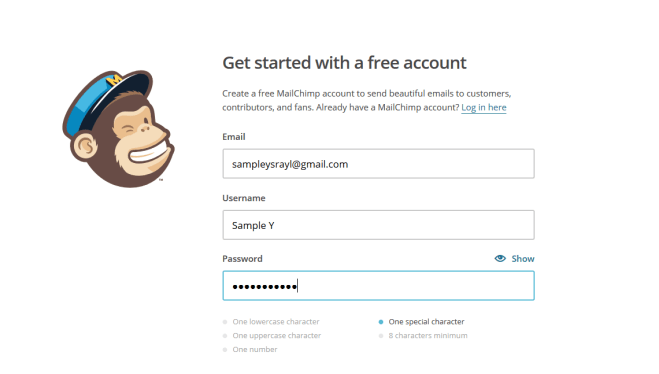
First, go to www.mailchimp.com and set up an account.

When creating a password, be sure you have a password using at least one capital letter, a number, and a special character:

Example_1 is an example of what would be accepted. If you don’t have at least one number, capital letter and special character it won’t let you go on.

After you set everything up, check your email and activate your account.

Here is where you enter your name and the name of your business.

Screenshot (59)Screenshot (60)

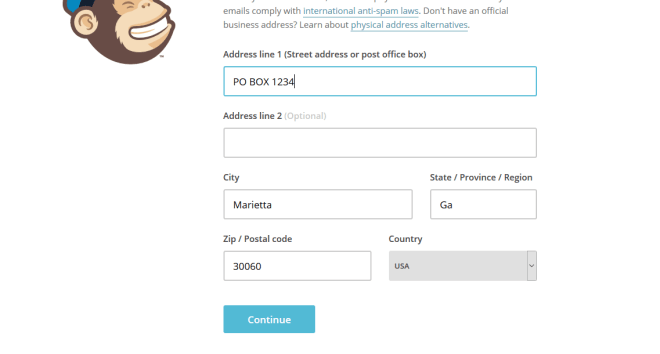
Next, you are going to have to add a physical address. This is because of anti-spam laws. Learn more about that HERE. But you can always come back to this page to change it later.

I would recommend your first and last name and the city, state, and zip in place of Do Not Contact. It looks more professional.

Your Name

Your City, State, Zip

Remember, a street address is optional so you don’t really need that and also remember that you can change this later.

Screenshot (61)

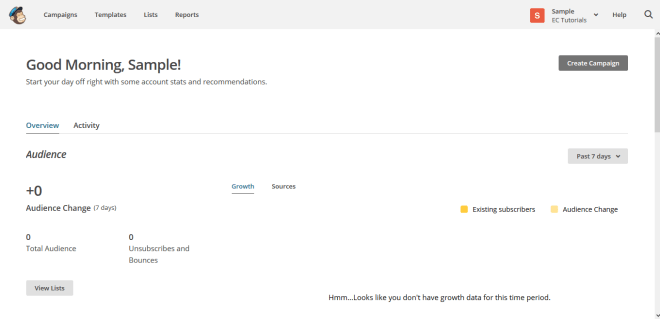
This is your dashboard. When you start sending emails you will see your campaign here, your data and so forth.

Screenshot (62)

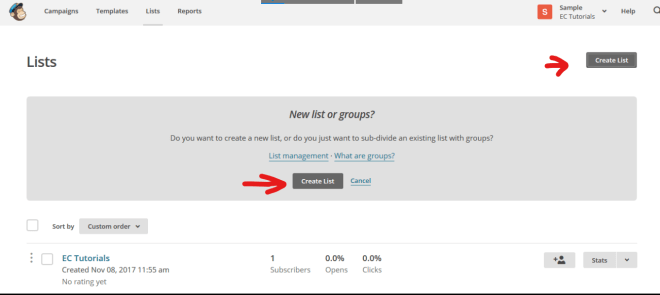
Now for the fun part. It’s time to get started. First, you need to create a List. Click on the List tab.

Go ahead and create list.

Screenshot (77)

List Name > The Name of Your Newsletter

Default from email > Your Business Email

Default Name > I highly recommend using a name people are familiar with already, such as your name. I started with Literary Korner Publishing but then switched to Yecheilyah and my open rates have increased tremendously since then. For your default name, I recommend using your name.

Remind people why they signed up > Wherever people could have accessed your form, put that here “You are receiving this email because…”

Screenshot (84)

Scroll down and check the address for this list. If you want to change it from when you first set up, do that now.

Screenshot (87)

Scroll down. Now that Mailchimp has changed to offer Single Opt-In, you can decide if you want to continue with a double opt in or not. Double Opt-In means once people sign up to your list they will have to confirm again before they are added, like always. Single Opt-In means they are automatically signed up when they first fill out your form. No checking emails and confirmations. They will be automatically added.

If you want Single Opt-In, leave this as is. If you want double opt-in, click on it.

Now, move on to notifications and check all that apply. It’s just asking how often you’d like to be emailed on activity with this list.

Screenshot (90)

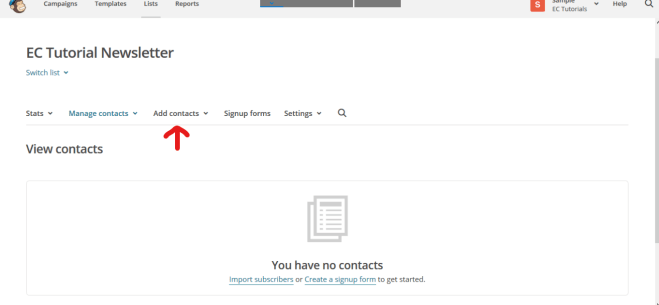
Next, you’ll see this page. Until someone is subscribed to your list, you’re done.

Or, you can manually add subscribers you have been given permission to add.

You can also import contacts from your email, assuming you’ve been given permission from those people to be added.

In any event, you won’t be able to send a Campaign or email until you have subscribers to the list.

To manually add subscribers, click add contacts and go from there. In the meantime, let’s move on to how to send emails.

(Reaching out to people to ask if they would like to join your list and if you can add them manually is another great way to increase your number of subscribers. Everyone doesn’t have to sign up, sometimes you can get creative and just ask around (Text messages, Facebook Messages, DM Twitter and IG Messages) All that matters is that you have their permission to sign them up.)

Screenshot (95)

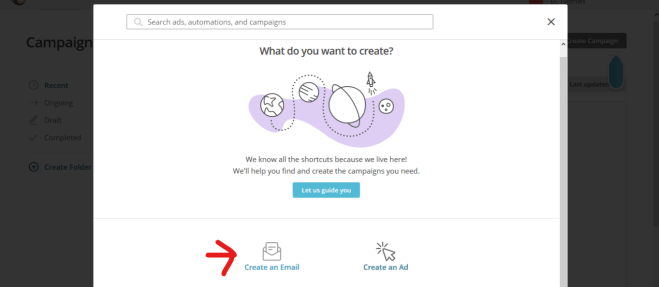
I added myself so that I can show you how to create a Campaign. Click on the campaign tab to get started. This page will come up with the floating arrow to show you where to click.

Screenshot (99)

Click on Create Email

Screenshot (103)

Name your campaign. Whatever your email is about.

Screenshot (105)

The next page is self-explanatory. Just complete the fields based on your list. The To field will ask what list you are wanting this email sent to. Choose the list (you’ll just have one list if you just started), save and proceed to the other fields.

Screenshot (109)

When you get to Design Email, you’ll see a page come up that looks like this. Choose the template of your choice. I am going to go with the follow-up.

Screenshot (111)

This is where you design your email. It’s super easy. Just drag, drop and enter text wherever you want. I am not going to bore you with a step-by-step with this. At least not yet, maybe in another post. However, I would like to caution about one thing….

Screenshot (113)

When I first started my email list I had colors and pictures and it was just going all the way on. While I can only offer suggestions (not guaranteed solutions), I would advise against this. As much as we want to showcase our personality, it helps if our email design is plain and simple. I know, that sounds boring but it’s easier on your audience.

Your email list is really not about you, it’s about the people who read them. Everything, from your subject line to your content and even your design is about making it easier on your subscribers. Therefore, I would say to stay away from too many colors, lots of widgets and pictures, and super long emails.

Personally, I love using my Cartoon Bitmoji as well as my Banner. Aside from these basics, I have taken everything else away. Here’s a snapshot of my real email list to give you an example:

Top

Screenshot (121)

At the top I have my banner (which can be your logo) and a display of my social media buttons. I WOULDN’T PUT MY SOCIAL BUTTONS ALL THE WAY AT THE BOTTOM. I would put them at the top and at the bottom.

Body

Screenshot (122)

The body of my emails have gotten a makeover since I first started. Black letters or gray against a white background. That’s it. Plain, simple, and easy to read.

Bottom

Screenshot (123)

My bitmoji cartoon takes us on out with a reminder to add me to your address book (so my emails don’t go to your spam), check your Spam and Junk Folders (in case my emails go to spam), and a reminder that Gmail emails from Mailchimp tend to go into the promotions folder.

Very Bottom / Signature

Screenshot (126)

Under the reminders is another look at my social widgets and my links.

OK, we’ve had enough Mailchimp for today. Just make sure your emails are clean, easy on the eyes (colors that are not too light or dark), easy to navigate and to the point.


Yecheilyah (e-see-lee-yah) is an Author, Blogger, and Poet of nine published works including work in progress and short inspirational guide “Keep Yourself Full.” Learn more by exploring Yecheilyah’s writing on this blog and her website at  yecheilyahysrayl.com. Renaissance: The Nora White Story (Book One) is her latest novel and is available now on Amazon.com.

Subscribe to Yecheilyah’s Email List HERE.