New Author Tip

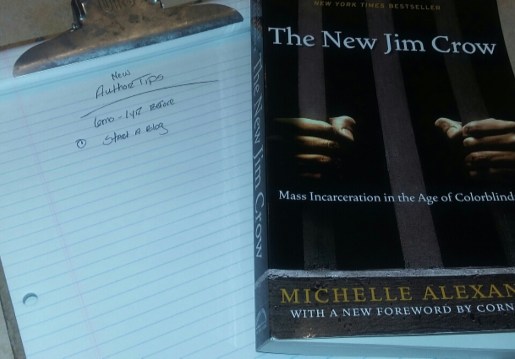
2017-12-08 13.17.01

Blogging has greatly impacted my writing life. The knowledge and wisdom from my fellow bloggers is amazing. I love that we build each other up and alert one another to things that may seem fishy in the publishing industry. I love that we promote each other and help advance the other’s writing life. That said, my tip for new authors is this:

This is just a suggestion, but if you are about to publish for the first time and you’ve never published a book before (and people don’t know you as a writer, maybe as other things but not as a writer) consider starting a blog at least 6 months to a year of publishing your first book. Spend that time talking about your passions, networking with other writers, readers and getting a feel for the online community. Don’t just talk about your work, talk about yourself. Post funny pictures, inspiring quotes, short story excerpts, articles and anything that appeals to your target audience and that (most of all) showcases your personality. Let people get to know you better while also getting to know the writer you. Then, when you’re ready to publish your book, you have a platform and people who are interested outside of your immediate circle.

This tip is only for those who are close to publishing. If you are still writing your book, I would say to focus on that for now. If you are publishing soon however, you may want to try blogging to test the waters. It’s a better platform for networking (in my opinion) than Facebook and Twitter.

MASTER LIST of Facial Expressions for Writers! – Bryn Donovan

Awesome. Authors, check it out. Very helpful list.

I created this list to address that challenge. The expressions are broken down by the part of the face. Note that some of them work for more than one emotion—a person might narrow their eyes out of vindictiveness or skepticism, for instance, and their face might turn red out of anger or out of embarrassment.

Some of them require a little more explanation on your part. You’ll have to say what she’s glaring at, or if his face is contorting in rage, or grief, or what. And not all of these will work for every character—it depends on what they look like and how they generally react to things.

Some of these aren’t exactly facial expressions, but useful for dialogue tags. In many cases I’ve given several ways to describe the same thing. While I have included some longer phrases, they are not proprietary and it’s fine to use them.

Click through to the ORIGINAL POST HERE to read the facial expressions. I am sure you’ll find a few to put to good use.

Confession and Cover Reveal

bitmoji-470945688

Many of you know that I have pushed my two bigger projects back but I’ve been low-key working on another one and yesterday, I revealed the news to my email list.

I have wanted to publish many of the poems featured on this blog (by featured I am referring to my own poems) in a book for a long time. I tried it with my third collection but since then I’ve written a lot more poetry. To make a long story short, I’ve finally submitted the final copy of I AM SOUL in to be edited last week and we’re looking at a release date as early as December 20th, my mother’s birthday.

COVER REVEAL – I AM SOUL


Inspiration Behind the Title

“You have an old soul.”

I don’t particularly like this phrase and I cringe when people tell me this. But, it is a fact that I’ve heard this many times over the course of my life, disguised in many different ways.

“You act older than you are.”

“You’re mature for your age.”

Or as my big sister so elegantly put it: “You old.”

So, I decided to drop the “Old” (because I’m young shooo lol) and just go with Soul.

Personal

I read something once that said, “The best writing is vulnerable.” I kept rolling this around in my head. It’s so true. I am extremely shy when it comes to my own personal feelings and I admit I am embarrassed to reveal too much of myself because, well, I think it will be too much. I’m too much yall (lol tee hee). But, the person was right. We connect deeper with people who we can relate to. People who are just as human as we are. People who make mistakes and are dripping with flaws. They may not always be this way, but they help us to see there is still hope. Their testimonies make redemption real. They are not somewhere in heaven while the rest of us are here on Earth. Their mistakes are a bridge of commonality that connects them to the rest of mankind. It is why we connect with people who are real.

This book is also a compilation of the Black History poems published to this blog which is another inspiration for the title. We have always had a unique way about us from our rich history to our style of dress to the way that we speak. We are the salt of the Earth. We are flavoring. We are Soul Train and Soul Brothers. We are soul.

I AM SOUL is personal in more ways than one and seeks to tell the truth. To be honest. To be vulnerable. To be weak and in that weakness, to be strong. ( 2 Co 12:10) This book is all things personal. This book is all things, soul.

So, there you have it. I’ll have more details and developments as we get closer to release but I am excited and I hope you will enjoy this collection just as much as you enjoy the poetry on this blog.

I AM SOUL- 3D

Coming Soon

Easy Blogging for Authors: 10 Tips for a Successful Author Blog, Anne R Allen

Anne is at it again with a most excellent article on Blogging for Authors. If you’re an author and you’re looking to learn more about how your blog differs from a business blog, check out this post. She talks being true to your brand, not defining your blog success by numbers, networking and not sacrificing your WIP (work in progress).

My biggest mistake was that I didn’t see that an author blog has a different purpose and goal from a business blog. Author blogs aren’t about making money directly with ads or sales.

Instead, they provide a platform for your writing and a way to communicate with readers and fellow writers. An excellent one. In fact, a blog is still the best platform-building tool for authors, according to agent Laurie McLean of Fuse Literary, (Laurie will be visiting us in January.)

Good writers don’t need gimmicks. We only need to entertain and inform: content really is king. Be accessible and be yourself. Nothing else matters. (Well, correct spelling and grammar help too. 🙂 )

Click through to the ORIGINAL POST HERE to read the entire article.

New Page for Introduce Yourself Author Feature + How Guest Posting Can Help You Win

As we approach the end of the year, I am doing what I always do at this time. Revisit my pages, update them, move some things around and maybe change my theme. In doing so, I’ve compiled all the Introduce Yourself Interviews and stored them away on their own page. You can now easily access the author’s interview using the Introduce Yourself Author Interview page. If you are one of the featured authors, you can also easily access your feature if you need to copy and paste your link or share it.

As a reminder, I am still looking for authors interested in being interviewed by me on this page. When I took that extensive break the feature slowed down but I am now ready to start scheduling again. AND if I missed you, please resend your information to my email HERE.

Interviews are published every Monday (being it’s already Sunday afternoon here whether we have one tomorrow will depend on how early I get some questions in).

Here are some benefits of being featured on someone’s blog:

Whether you are guest blogging or being interviewed, promoted or featured, as a guest your work is introduced to a NEW audience. This gives people who have never heard of you or your books an opportunity to learn more about you, follow your blog and check out your social media pages.

I’ve heard it said that guest posting is FIVE TIMES GREATER than posting to your own blog. Now, I am not sure how accurate that is but I do know from experience that guest posting gives you the opportunity to connect with a new group of people and to share your expertise or skill. If you wrote a book, I believe you are an expert on the subject matter that you are writing or have written about. In fact, I believe we are all experts in some way. Everyone is a genius when we focus on our own individual gifts. We have all been given something special that others can learn from.

You could have been blogging for five years and promote your books the whole time only to find out, after posting to someone else blog, that few people knew you existed. That’s the power of networking. Being featured on someone’s blog is stepping outside the box. If you’ve been blogging longer than one year, chances are you are already comfortable with your own blog. If you want to continue this growth, step outside your comfort zone and introduce your books to a new audience. Why not start here? Whenever I publish an Introduce Yourself Feature, it always becomes the most viewed page on my site for that week and a few authors have even informed me that they have sold a book or two.

VISIT THE ORIGINAL POST HERE TO GET STARTED

and Remember, this feature is FREE.

Not interested in an interview but have books to promote? Just shoot me an email with your covers, links, bio, and release date. I’ll be happy to help you to spread the word!

Note: If you have any trouble with the email link or emailing me in general, use the contact page.


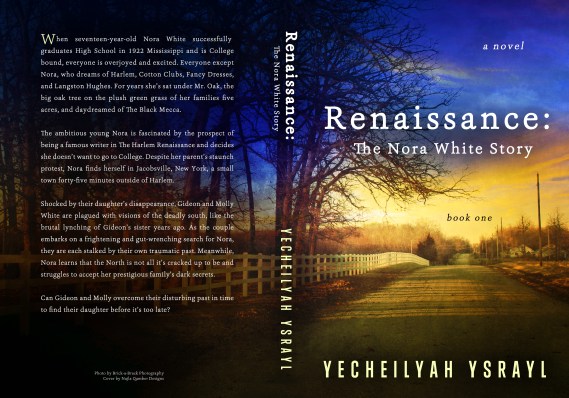
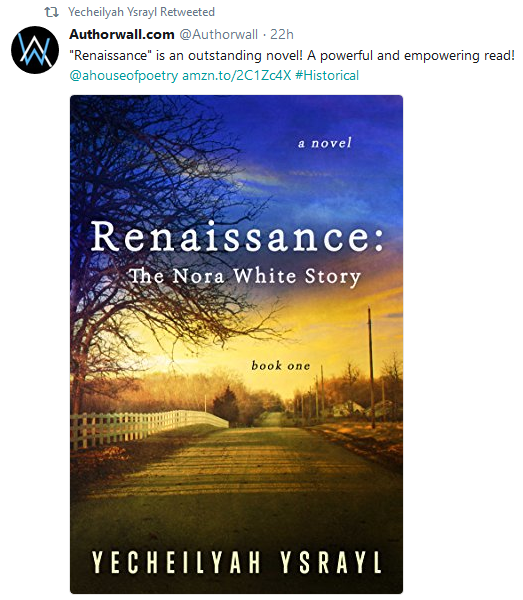
Yecheilyah (e-see-lee-yah) is an Author, Blogger, and Poet of nine published works including Renaissance: The Nora White Story (Book One), her latest novel available now on Amazon.com. Learn more by exploring Yecheilyah’s writing on this blog and her website at  yecheilyahysrayl.com.

Self-Publishing: Don’t Forget to Set Up Your Amazon Author Central Page

UPDATED: The layout has changed since this post was last published in 2017. I am republishing this with instructions on using the new platform, which I have found more straightforward than the previous layout.


I read a ton of books written by Indie Authors. If I like a book, I am going to click on their name on Amazon.

What happens when I click on this name are two things:

  • It will take me to the author’s page with a listing of all their books to date, along with their bio, videos and photos, blog updates, and website link. (Update: Amazon Author Central no longer includes the blog posts.)

Or..

  • It will take me to a page on Amazon with a listing of that author’s book, along with a lot of other authors.

Authors, don’t forget to set up your Amazon Author Central Page. In this post, I show you how.

What is an Author Central Page?

Author Central is your author page on Amazon. If this is set up, readers can click on your name under your book as seen below…

Screenshot (15)

And be taken to a page that looks like this….

Page

Update: The page looks different now, but it still lists your books and other info as shown.

There’s an author photo, bio, display of all the books you have on Amazon next to your photo, and at the bottom. You can also add your blog feed to your page and videos.

Update: You can no longer add your blog feed.

Getting Started

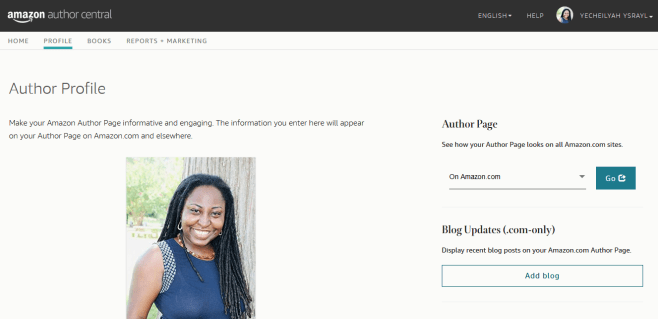
First, go to https://authorcentral.amazon.com/ and sign in.

The layout of the page has changed. You used to see this page…

Now it looks like this…

And it is a lot easier to set up this way.

On this page, go to Edit Profile

It will take you to a page that looks like this.

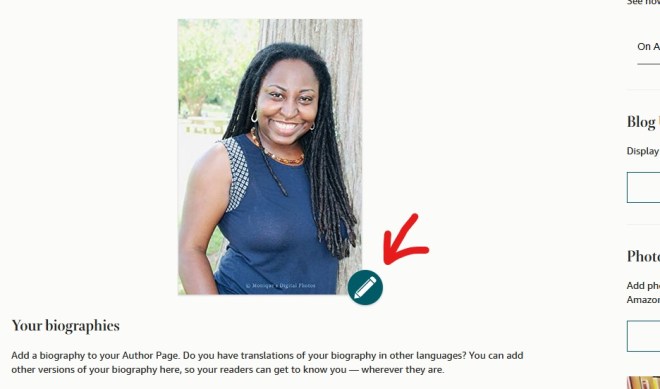
Upload your photo here…

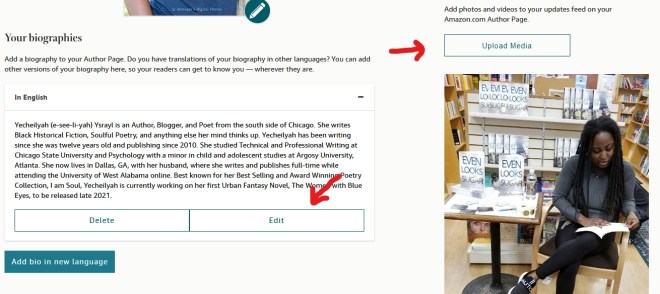
Add a bio here and media like photos and video

Now add your books…

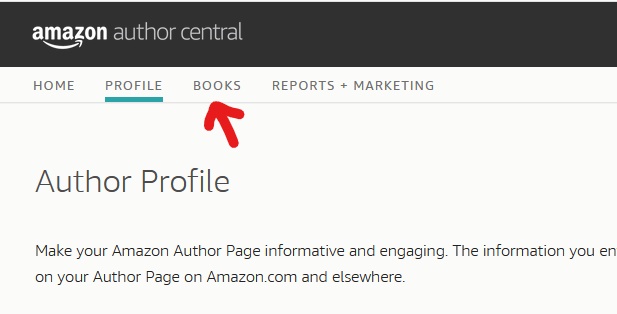
Scroll back up and click on Books

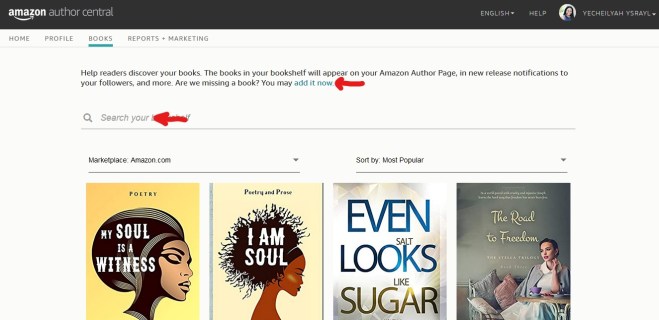
It will take you to a page that looks like this. If you have books already added you should see them here.

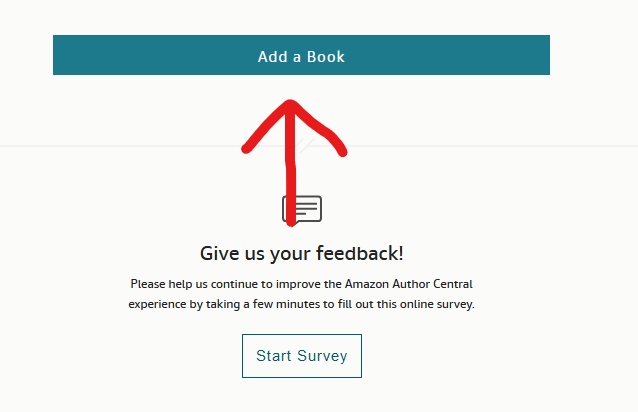
If you have no books added, simply click on the Add a Book Button

And then search your book on Amazon by your Name, Title, or ISBN


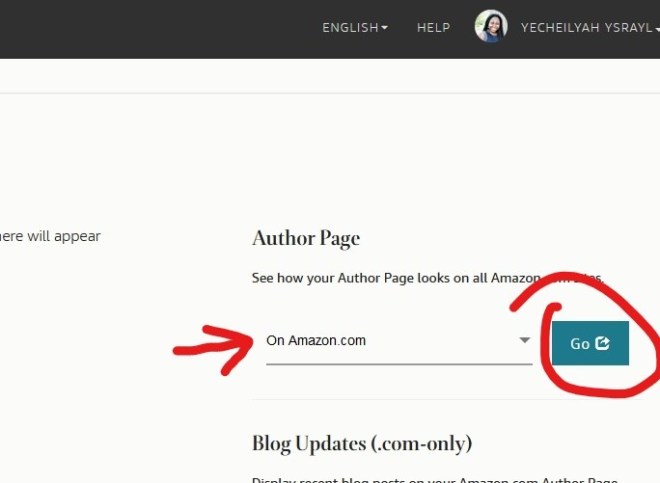
Now go back to profile and click here to see your page on Amazon.

It should take you back to this page

Now test it. Go back to your page and click on your name.

Screenshot (15)

If set up correctly, it should take you back to the page you just left.

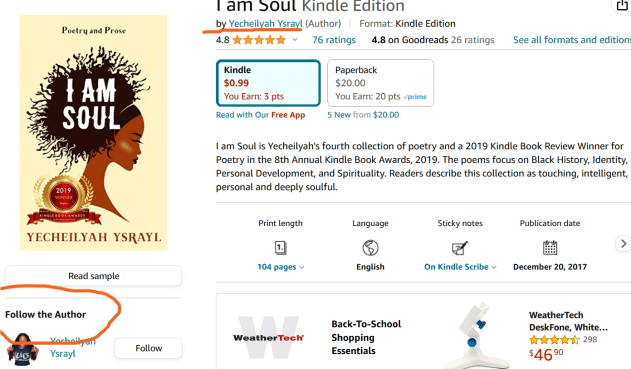
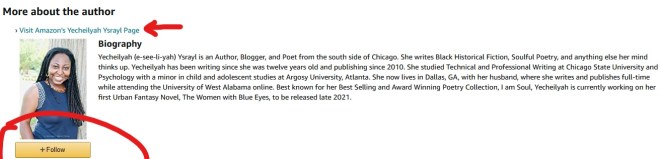
Another thing that makes this cool is that your bio will also show up on the book page where readers have bought it. And once again, it is the opportunity for readers to follow you! It looks like this.


I hope this has helped someone!

Check out more Indie Author Basics Here.

Setting up with MailChimp

Setting up an email list isn’t part of every author’s platform but for those who are looking to set up, you have a number of them to choose from:

  • Convertkit
  • Mailerlite
  • Mailchimp
  • Aweber

….and so on…

Today, I’d like to talk a bit about MailChimp and show you how easy it is to get started. (It is free for your first 2,000 subscribers)

First, go to www.mailchimp.com and set up an account.

When creating a password, be sure you have a password using at least one capital letter, a number, and a special character:

Example_1 is an example of what would be accepted. If you don’t have at least one number, capital letter and special character it won’t let you go on.

After you set everything up, check your email and activate your account.

Here is where you enter your name and the name of your business.

Screenshot (59)Screenshot (60)

Next, you are going to have to add a physical address. This is because of anti-spam laws. Learn more about that HERE. But you can always come back to this page to change it later.

I would recommend your first and last name and the city, state, and zip in place of Do Not Contact. It looks more professional.

Your Name

Your City, State, Zip

Remember, a street address is optional so you don’t really need that and also remember that you can change this later.

Screenshot (61)

This is your dashboard. When you start sending emails you will see your campaign here, your data and so forth.

Screenshot (62)

Now for the fun part. It’s time to get started. First, you need to create a List. Click on the List tab.

Go ahead and create list.

Screenshot (77)

List Name > The Name of Your Newsletter

Default from email > Your Business Email

Default Name > I highly recommend using a name people are familiar with already, such as your name. I started with Literary Korner Publishing but then switched to Yecheilyah and my open rates have increased tremendously since then. For your default name, I recommend using your name.

Remind people why they signed up > Wherever people could have accessed your form, put that here “You are receiving this email because…”

Screenshot (84)

Scroll down and check the address for this list. If you want to change it from when you first set up, do that now.

Screenshot (87)

Scroll down. Now that Mailchimp has changed to offer Single Opt-In, you can decide if you want to continue with a double opt in or not. Double Opt-In means once people sign up to your list they will have to confirm again before they are added, like always. Single Opt-In means they are automatically signed up when they first fill out your form. No checking emails and confirmations. They will be automatically added.

If you want Single Opt-In, leave this as is. If you want double opt-in, click on it.

Now, move on to notifications and check all that apply. It’s just asking how often you’d like to be emailed on activity with this list.

Screenshot (90)

Next, you’ll see this page. Until someone is subscribed to your list, you’re done.

Or, you can manually add subscribers you have been given permission to add.

You can also import contacts from your email, assuming you’ve been given permission from those people to be added.

In any event, you won’t be able to send a Campaign or email until you have subscribers to the list.

To manually add subscribers, click add contacts and go from there. In the meantime, let’s move on to how to send emails.

(Reaching out to people to ask if they would like to join your list and if you can add them manually is another great way to increase your number of subscribers. Everyone doesn’t have to sign up, sometimes you can get creative and just ask around (Text messages, Facebook Messages, DM Twitter and IG Messages) All that matters is that you have their permission to sign them up.)

Screenshot (95)

I added myself so that I can show you how to create a Campaign. Click on the campaign tab to get started. This page will come up with the floating arrow to show you where to click.

Screenshot (99)

Click on Create Email

Screenshot (103)

Name your campaign. Whatever your email is about.

Screenshot (105)

The next page is self-explanatory. Just complete the fields based on your list. The To field will ask what list you are wanting this email sent to. Choose the list (you’ll just have one list if you just started), save and proceed to the other fields.

Screenshot (109)

When you get to Design Email, you’ll see a page come up that looks like this. Choose the template of your choice. I am going to go with the follow-up.

Screenshot (111)

This is where you design your email. It’s super easy. Just drag, drop and enter text wherever you want. I am not going to bore you with a step-by-step with this. At least not yet, maybe in another post. However, I would like to caution about one thing….

Screenshot (113)

When I first started my email list I had colors and pictures and it was just going all the way on. While I can only offer suggestions (not guaranteed solutions), I would advise against this. As much as we want to showcase our personality, it helps if our email design is plain and simple. I know, that sounds boring but it’s easier on your audience.

Your email list is really not about you, it’s about the people who read them. Everything, from your subject line to your content and even your design is about making it easier on your subscribers. Therefore, I would say to stay away from too many colors, lots of widgets and pictures, and super long emails.

Personally, I love using my Cartoon Bitmoji as well as my Banner. Aside from these basics, I have taken everything else away. Here’s a snapshot of my real email list to give you an example:

Top

Screenshot (121)

At the top I have my banner (which can be your logo) and a display of my social media buttons. I WOULDN’T PUT MY SOCIAL BUTTONS ALL THE WAY AT THE BOTTOM. I would put them at the top and at the bottom.

Body

Screenshot (122)

The body of my emails have gotten a makeover since I first started. Black letters or gray against a white background. That’s it. Plain, simple, and easy to read.

Bottom

Screenshot (123)

My bitmoji cartoon takes us on out with a reminder to add me to your address book (so my emails don’t go to your spam), check your Spam and Junk Folders (in case my emails go to spam), and a reminder that Gmail emails from Mailchimp tend to go into the promotions folder.

Very Bottom / Signature

Screenshot (126)

Under the reminders is another look at my social widgets and my links.

OK, we’ve had enough Mailchimp for today. Just make sure your emails are clean, easy on the eyes (colors that are not too light or dark), easy to navigate and to the point.


Yecheilyah (e-see-lee-yah) is an Author, Blogger, and Poet of nine published works including work in progress and short inspirational guide “Keep Yourself Full.” Learn more by exploring Yecheilyah’s writing on this blog and her website at  yecheilyahysrayl.com. Renaissance: The Nora White Story (Book One) is her latest novel and is available now on Amazon.com.

Subscribe to Yecheilyah’s Email List HERE.