When Artists Go to Work

Toni Morrison

You don’t have to write a think piece today.

You don’t have to post a long, drawn-out social media thread about America’s sins.

You don’t have to debate and argue with people in the comments.

It might look like a gloomy day for some of you, but I want to remind you that Joy remains.

And do you want to know why Joy remains?

Other than you woke up this morning?

As Toni Morrison puts it, this is precisely the time when artists go to work!

“There is no time for despair. No time for pity. We speak. We write. We do language.” – Toni Morrison

This raw vulnerability many of you are feeling is precisely what you should put into the work.

Allow this emotion, good or bad, to bleed into one of the most potent poems you have ever penned.

Let it be the most profound and truthful piece you’ve ever written.

You don’t have to post it to social media, but write it down.

What I know of moments: They pass.

This historical moment will be written on the pages of history books, so what should you do?

Do what you’ve always done. Do the work.

As one woman put it on Facebook:

“You are awakening to the same country you fell asleep to. The very same country. Pull yourself together. And when you see me, do not ask me, ‘What do we do now?’ How do we get through the next four years?’ Some of my ancestors dealt with at least 400 years of this under worse conditions. Continue to do the good work. Continue to build bridges, not walls. Continue to lead with compassion. Continue the demanding work of liberation for all. Continue to dismantle systems. Continue to set the best example for your children.”

“Continue to be a vessel of nourishing Joy.”

– Venice Williams


Remember, we are accepting submissions for this year’s poetry contest on Joy from now through December 1st! Get started by subscribing at yecheilyahsannualpoetrycontest.org.

Click Here For the Entry Rules and Guidelines

If you would like to support our poets with a donation, you may do so by clicking on the website’s donation page here.

Hope to see you soon!

Yecheilyah’s 1st Annual Poetry Contest Winners, 2017

Yecheilyah’s 2nd Annual Poetry Contest Winners, 2018

Yecheilyah’s 3rd Annual Poetry Contest Winners, 2019

Yecheilyah’s 4th Annual Poetry Contest Winners, 2021

Yecheilyah’s 5th Annual Poetry Contest Winners, 2022

Yecheilyah’s 6th Annual Poetry Contest Winners, 2023

Pockets of Joy

She Wins Society, 2023

Last year, members of She Wins Society were surprised with awards in the mail honoring their contribution to the community. Imagine my excitement about getting Most Poetic Sister. Scrolling through pictures on my phone, this one stuck out as we prepare for our Conference and Awards Ceremony on November 9th!

It also revealed to me the role that photographs and images play in our joy.

Images are not only suitable for memories; they are silent whispers of time, capturing fleeting moments of joy and weaving stories without words. Pictures are pockets of bliss that freeze laughter and emotions we can experience whenever we look back at them. 

Sometimes, when I want to experience joy in a difficult moment, I look at snapshots of a happier time. Each frame holds a fragment of elation, and in their stillness, they evoke the essence of joyful energy. 

Remember, we are accepting submissions for this year’s poetry contest on Joy from now through December 1st! Get started by subscribing at yecheilyahsannualpoetrycontest.org.

Click Here For the Entry Rules and Guidelines

If you would like to support our poets with a donation, you may do so by clicking on the website’s donation page here.

Hope to see you soon!

Yecheilyah’s 1st Annual Poetry Contest Winners, 2017

Yecheilyah’s 2nd Annual Poetry Contest Winners, 2018

Yecheilyah’s 3rd Annual Poetry Contest Winners, 2019

Yecheilyah’s 4th Annual Poetry Contest Winners, 2021

Yecheilyah’s 5th Annual Poetry Contest Winners, 2022

Yecheilyah’s 6th Annual Poetry Contest Winners, 2023

Blogger Tip 02 – How to Reduce the Number of Images Required in Your WordPress Media and SAVE STORAGE SPACE…

Part 2 – How to Reduce the Number of Images Required in Your WordPress Media and SAVE STORAGE SPACE from Chris.

Chris The Story Reading Ape's avatarChris The Story Reading Ape's Blog

WP TIP 1

If you use more than one image in your posts, then use WordPress Publicize to automatically upload your post to Twitter, Facebook, etc, or, manually upload them, the image last inserted into your post, is the one that will be displayed on your media.

To avoid the wrong image being displayed, either:

Insert it LAST

OR

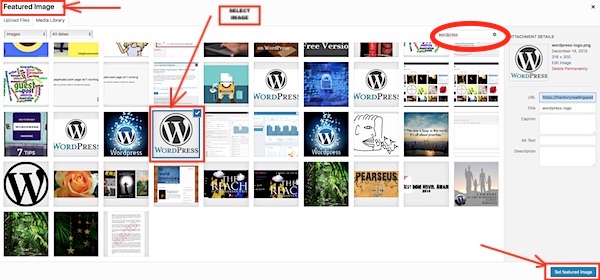
Select it as your ‘Featured Image’

Authors especially would probably prefer their Book Cover being displayed, rather than some other, random, image.

WP TIP 2

If you opt for using a Featured image, or, have the same image appear more than once in your post (as I’ve done on this post):

You DO NOT NEED to upload the same image for each separate appearance!

Select the same image to be inserted wherever you want it to be shown in the post.

This will save taking up unnecessary space in your media…

View original post 45 more words

Blogger Tip 01 – How to Resize Images inside your WordPress Media and SAVE STORAGE SPACE..

Very good post from Chris on resizing your images to save storage space in WordPress so you don’t have to upgrade. No use spending money we don’t have to spend. I’ll be doing this tonight. #Winning

Chris The Story Reading Ape's avatarChris The Story Reading Ape's Blog

Have you been using images that are VERY LARGE, and/or, PNG Format?

Have you been reblogging and noticed how LARGE, some folks make their images?

Result

Running out of space in your WordPress Media Storage and thinking about paying for more?

Unless you are displaying your own images / photos, and WANT to have them full size

Before you spend any money, go through your Media Storage images and reduce their sizes

You might be shocked at how much longer you can work with the storage space you save.

Step 1:

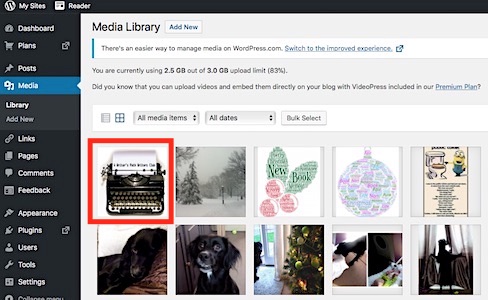
Select an image and click on it to see it’s size (width x height in pixels)

and

how much it ‘weighs’ (i.e., how many KB or MB it is):

Step 2

My example has already been adjusted, but you can see it’s size and weight

To reduce them, click on the Edit Image button shown under the image:

Step…

View original post 127 more words

REMINDER: Dear Book Bloggers (and others promoting authors) – Guest Post by, Yecheilyah Ysrayl…

REPOST from The Story Reading Ape Blog. Please click the link below for the original post to my latest guest post.

Also, I am actually back from my break so excuse that tidbit. I wrote this a couple months ago.

http://wp.me/p3mGq7-gup

Editing Mock-Ups in Photoshop: Don’t Forget to Hide Layers You Don’t Want to Show

In May, I wrote a blog post tutorial on how to edit Mock-Ups in Photoshop for a professional looking 3D book cover image. I understand it went over some heads (Photoshop is not for everyone), but for those of you who are familiar with it already, be sure that you are hiding the layers you don’t want to use so your image looks more authentic.

Everyone is using Mark Monciardini’s Mock-Ups (Covervault) because they’re free. While everyone is using them, not everyone is familiar with the basics of Photoshop in ways they can get the most out of the experience. It’s like copying someone but because you don’t really know how to do it, it doesn’t have the same look. Mark is the real artist and we are all copying him pretty much. He has extended his expertise to us newbies by generously giving away his mock-up templates. Now anyone, with just a basic knowledge of Photoshop, can have professional looking 3D book cover images. But, make sure you are hiding layers you don’t need so your images don’t look the same as everyone else.

I’m going to use the wine bottle glass template as an example.

What you have here is everything as it is originally. One of the first things you’ll probably want to do is change the book cover. Most people stop here. Boom, they are done. Save. You can do that but it won’t look very original.

Here’s mine with Renaissance cover. It looks good but not very original. I did change something though. Can you guess what it is? No, not the cover. (Learn how to change the cover HERE) I changed something else.

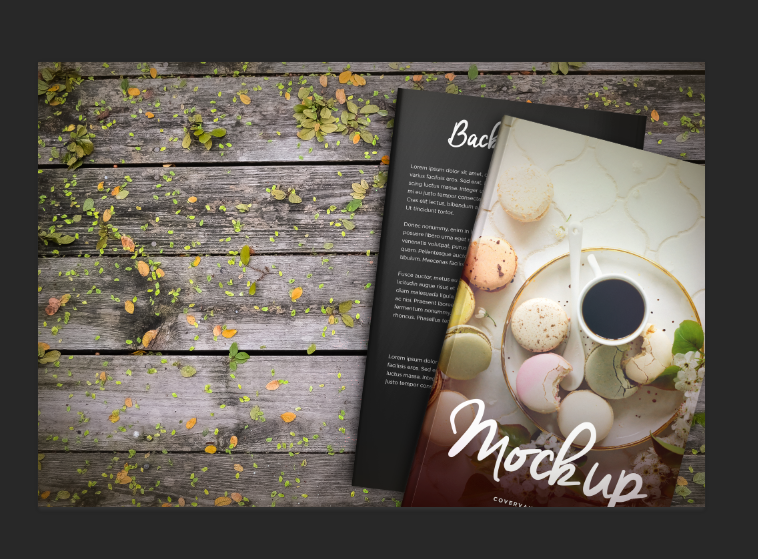
I hid a layer and took something away. That’s right, there are no sparkles.

To switch things up, all you have to do is hide layers you don’t need or want in your image.

To hide the particles, I went over to the layers and clicked on the drop-down menu next to particles. Next to the sparkles, (I like the word sparkles better. Sounds more girly lol), I clicked on the eye to hide them. That is literally all I did.

You can do this with anything you don’t want in your image. Even the background. Don’t like the wine bottle look? Get rid of it.

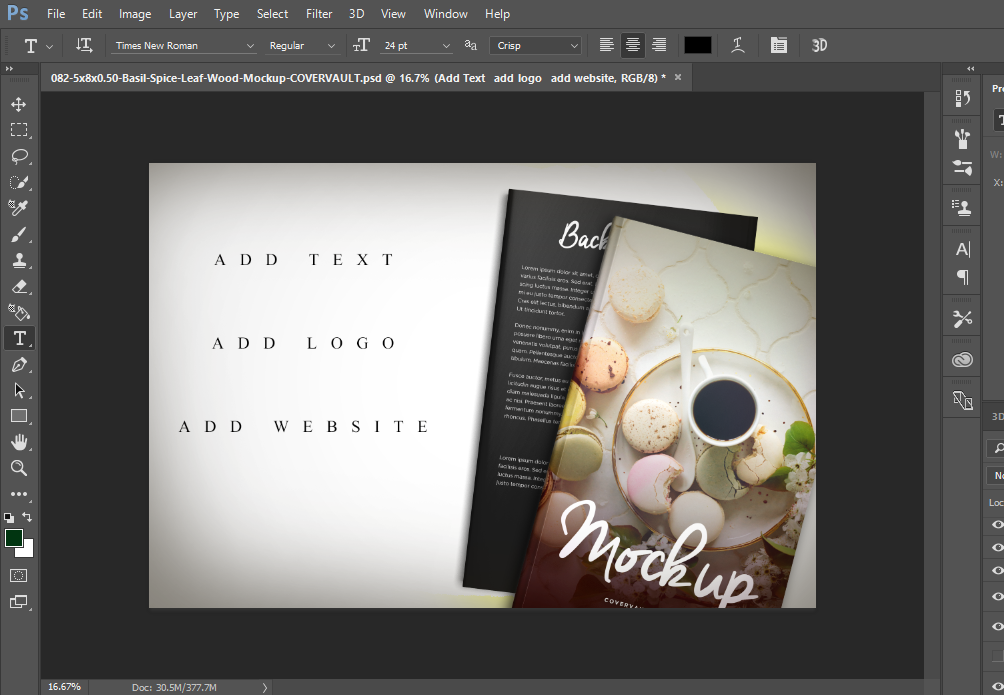
If I don’t want the background at all, I can hide the background and upload my own. All I did was click on the eye next to backdrop and hid it (you can also delete layers but I prefer hiding them in case I want to use them again).

Here’s a closer look:

Basically, whatever you don’t want in the image can be hid. You can now use the space to add text, a logo or whatever you want. While all this is optional, remember that if you’re going to add text to a mock-up that has a lot going on, we won’t be able to read it clearly if you don’t hide or delete those layers first. Let’s look at one more:

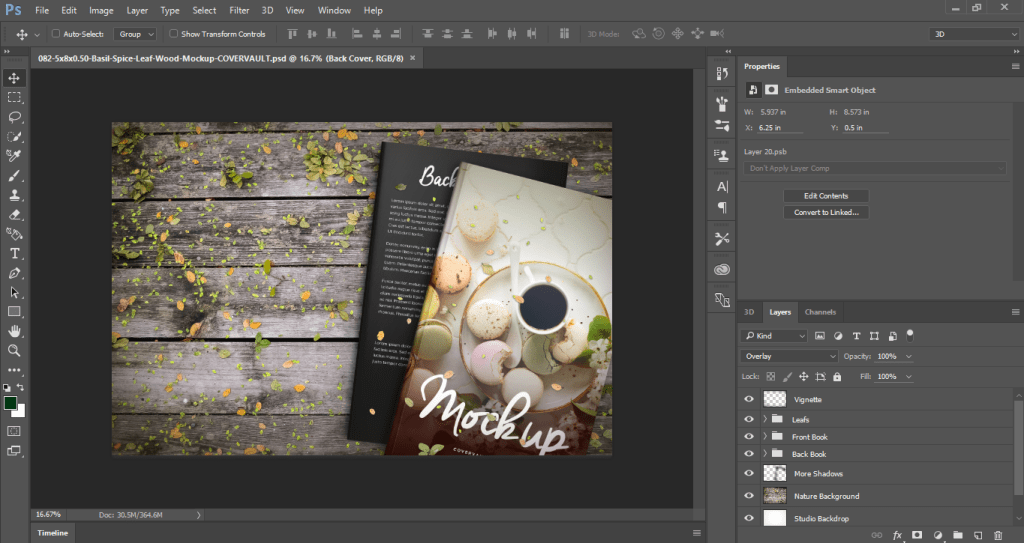
This is the original but remember, you can completely make it over so it looks more you.

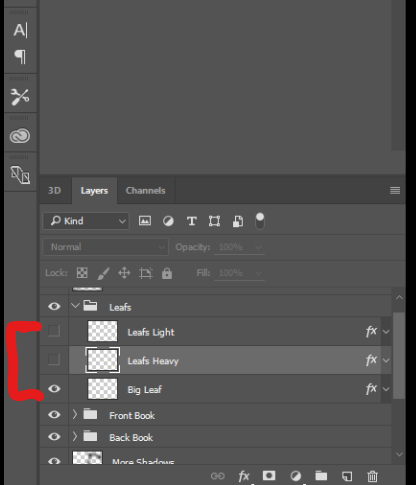
First, you want to get rid of all these leaves (unless of course you want them there which I don’t). To hide them, go over to layers and click on the eye to all the leaves. Light Leaf, heavy leaf and big leaf. Hide them all.

The leaves are gone but that background still makes it look leafy. Unless you want that, you can change the background too or hide it altogether.

To change the background, go over to layers and hide the entire background.

What you have is a blank slate. You can now add text, logo, whatever you want.

You can actually upload your own background but we’ll go over that at a later time.

The point is that if you’re going to pay for Photoshop you may as well get as much from it as possible. To help your images to look more authentic, be sure to hide (or delete) layers you don’t want or need.

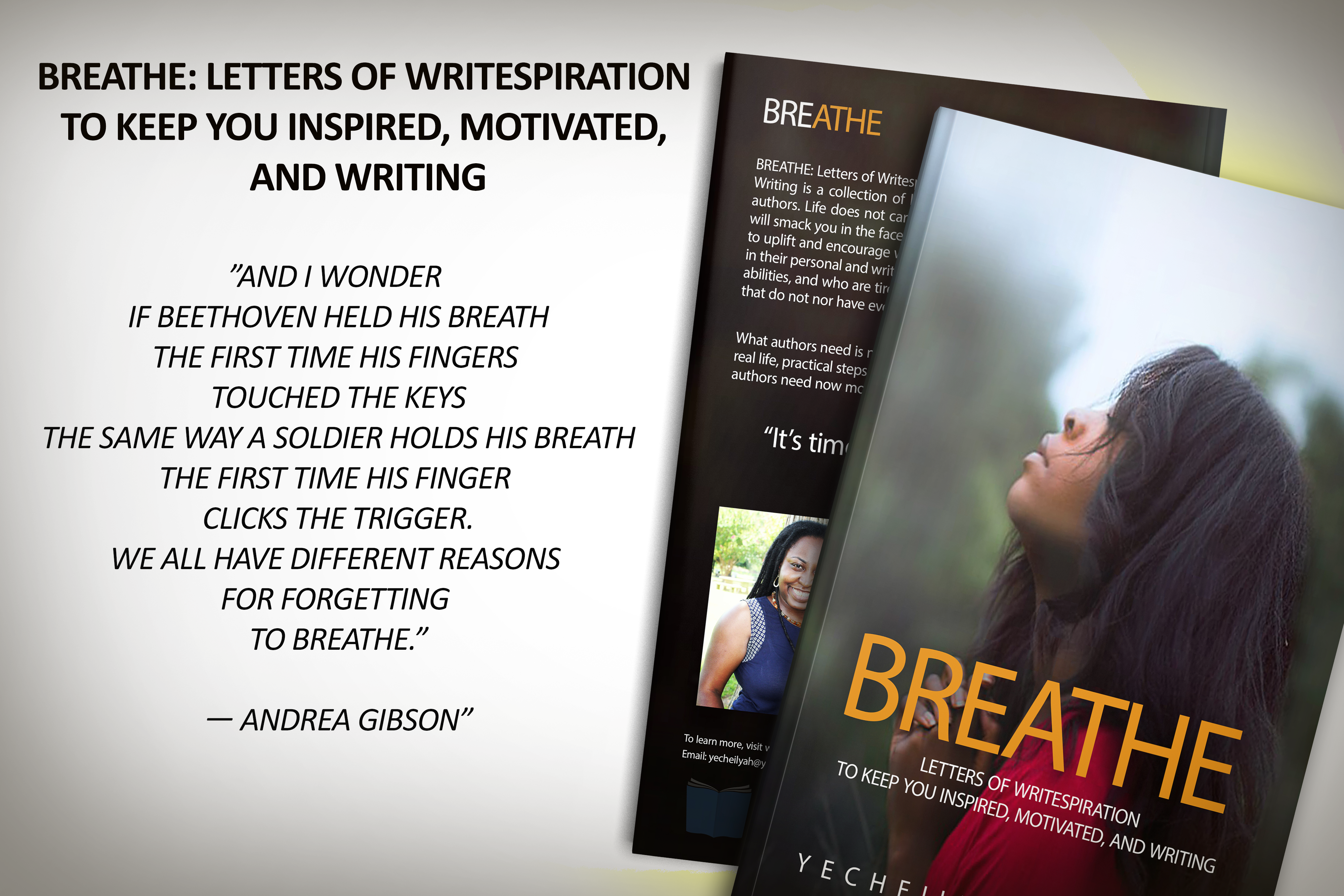
Here’s a finished one using one of my WIP:

8 Things to Do Before Publishing Your Next Blog Post

blog-growth-update1-800x675

Below are some great links from This Mama Learns Blog to help us become better bloggers! I discovered her on Pinterest yesterday and her blog is super cute! I love the way she has branded her colors and incorporated her images all professional and fun looking. Below are articles I found helpful. Enjoy:

8 Things to Do Before Publishing Your Next Blog Post

You’re running behind on your newly acquired content schedule.

You dash out the last few lines of your next post in a flurry of activity, half an hour after you should have been in bed.

Then you hit Publish.

*yawn* Time for bed.

Okay, you know there are a few things you probably should’ve done first, but you can do it later right?

Umm…

What just happened here? This hypothetical blogger (ok, ok… it was me), just put an arbitrary schedule before producing quality content.

Not cool.

Keep Reading http://thismamalearns.com/8-things-to-do-before-publishing-your-next-blog-post?utm_source=twitter&utm_medium=social&utm_campaign=SocialWarfare

5 Secrets to Help You Look Like A Pro Blogger (even if you only started, like, yesterday)

No one likes looking like they were born yesterday, right? First impressions count, so when people visit your blog, you want to have your best foot forward.

I made my first blog in 2011. It was about tween fashion (it seemed like a good idea at the time), it was eyes-bleedingly cyan and I think I used Comic Sans. Sounds like a candidate for ugliest website of the year!

Luckily, times have changed and the overall standard of new blogs has greatly improved.

But there are still a few mistakes that new bloggers make that give themselves away. Here are 5 things you can implement on your blog right now to make you look like a pro.

Keep Reading http://thismamalearns.com/how-to-look-pro-blogger

How to Launch Your Blog with a Bang

Ever launched a blog expecting to make a big splash but… nothing happened?

You were sending post after post out into the ether. No readers (not even your mom), no comments, no shares.  Why?

It wasn’t that your content wasn’t good.

And it wasn’t that you weren’t blogging frequently enough.  You were working your fingers to bone every day getting out another post.

Maybe you were even employing a bit of SEO and churning out awkward blog headlines like How to choosing a domain name (did I do that? oops!)

It doesn’t have to be this way. You can launch a successful blog and have readers from day 1.

Keep Reading http://thismamalearns.com/launch-your-blog-with-a-bang

Beginner Bloggers Guide to Networking

Are you holding back from networking with other bloggers because you feel like your blog just isn’t ‘good enough’?

Have you joined a few Facebook groups (like I told you about in this post), but been too shy to speak up because you’re afraid you’ll get laughed at for not knowing the secret blogger handshake?

Do you read blogging tips about how to get more traffic and think YEAH I need to do that, but secretly you’re terrified to have people actually read your blog?

Let me let you in on a little secret:

I’ve SO been there.

Keep Reading http://thismamalearns.com/beginner-bloggers-guide-to-networking