OK Everyone, I want to thank those of you who have participated so far today and who have taken the opportunity to support my work. I have personally had fun and I am really enjoying giving away these prizes to you beautiful people. I have decided to put a poll up on the Static Page of this blog with the last Trivia Question. I am leaving this up on the front page for this week only (8/24 – 8/31) The winning prizes are…
But first, thank you all so much for playing and hanging out with me. As we close out, I will be posting my author website for the final time this afternoon along with the links to the eBook retailers. I have no intentions of stalking your emails but this is Launch Day and all, and thus my shameless self promo is warranted (smiles), but your support is sincerely appreciated. To all of our winners so far, please give me 5 – 7 business days to ship your prizes.
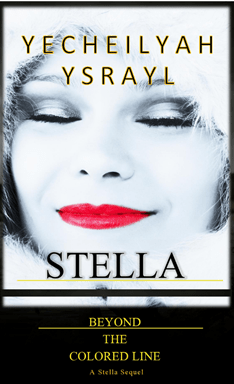
The winners of the question on the front page will receive a Free Copy of Stella Book #2 and a matching bookmark. I will also sign it. As a program note: those of you who buy a paperback version of the book will receive a free bookmark.
Hunger Games: Its Lunch Time! Be the first to answer this question correctly and win a Free Copy of Stella!
I am taking the first 3 correct answers this time! That’s right, 3 people have a chance to win this prize. AND, to make sure you keep your place and all, I am throwing in 3 matching Stella Bookmarks! So here goes:
On Sunday’s Stella’s mom Judith cooks a feast of a dinner. Which of these foods according to your best guess was NOT on the dinner table? This is easy if you’ve been paying attention to me :).
a. Brim and Crappy
b. Spaghetti and Meatballs
c. Fried Chicken and Macaroni
d. Greens, Neck-bones and Cornbread
Meanwhile, I’m gonna grab some lunch. Listen to this throwback from the movie Soul Food and I will be back with the answer! Love ya mama’s for cooking all those delicious meals!
Winners announced soon! This is for a FREE Copy of the book. Hurry! Comment your answer below.
Fresh Cup: Since it’s still early, the name of this game is Fresh Cup. Sit down and have a cup of coffee or tea with Stella by winning a Free Coffee Mug when you answer this question correctly. I will take the first 2 commenters to this post:
Stella’s life takes place during the Jim Crow Laws that forbade African American’s from doing certain things. Name at least two of the things blacks couldn’t do during this time.
First I want to thank everyone in advance who plans to participate in today’s festivities, and welcome to my first Blog Book Release Trivia! We’ll get started in about an hour (since people are still coming through the door and all). Comment on this post if you plan on winning some prizes tonight!!!
sample e-book properly formatted (not just converted!)
One of the most challenging aspects of Self-Publishing for me, in the beginning, was preparing my book for e-book conversion for proper viewing as an e-book on electronic devices. Of course, formatting and conversion slightly differ (anyone can use the method I am about to show to make ePub and Mobi files, but unless you format the underlying HTML and CSS properly, the result will not look as professional as we all intend as authors like the image above. Often there will be blank lines between paragraphs, no indentations, no TOC (table of contents), links that don’t function, and everything left aligned including headings that were meant to be centered hence, the difference between conversion and actual formatting…. but that’s another post for another day).
So anyway, as I ventured on this Self-Publishing endeavor, I was practically pulling my locs out trying to prepare my manuscript to be accepted by retailers for electronic devices. As we are familiar, manuscripts that are prepared for an e-book has to be done in a way where the electronic device can easily navigate the book. The electronic device easily accomplishes this by utilizing the navigation functions built into an EPUB file to move around the e-book. This is done by properly creating a Table of Contents section or in technical terms, a Navigation Control File. Basically, because your device is not going to be printed like in the old days, it needs guidance on how to move around. Your Kindle or Mobile phone needs to know where each section begins and ends. It does this by looking for Header Styles in your document. While you can either pay someone else to do this or let your POD (Print on Demand) service do it for you, an easy way to learn to do it yourself is to format your manuscript using Heading Styles. Heading Styles are at the top of your Word Document and looks something like this:
So Below I’ve listed how each section should be properly headed using these Heading Styles to create the TOC. To make this simple, I am only going to assume your book has a few main levels: Title Page, Copyright, Chapter, Sub-chapter, Preface, Body, Epilogue, and Sections:
1. Apply Heading 1 style to the Title and to each line containing a Section name (copyright, prologue, etc.) or section (Part 1, Section II, etc.). Heading 1 style will always appear at the top of the next page.
2. Apply Heading 2 style to each line containing a Chapter name or number
3. Apply Heading 3 style to each line containing a sub-chapter / subtitle or subsection.
That’s it! Pretty simple huh? I know most of you already know how to do this, but you never know who else may be pulling their hair out :). In most cases, your POD distributor will not reject your manuscript if you use this format.
(Don’t use additional Heading styles (Heading 4, Heading 5) to denote chapter or section breaks, as these will not generate most TOC *Table of Contents* entries. Most readers will not be able to navigate to these chapters resulting in retail distribution partners, such as Amazon Kindle and B&N, to reject your e-book).







 The PBS Blog